Solar Simulator Pro
An interactive web-based simulator designed to help creatives and remote workers in Nigeria design, configure, and plan sustainable off-grid solar backup power systems. Features real-time load analysis, weather integration, extended survival modeling, and configuration persistence for iterative design.
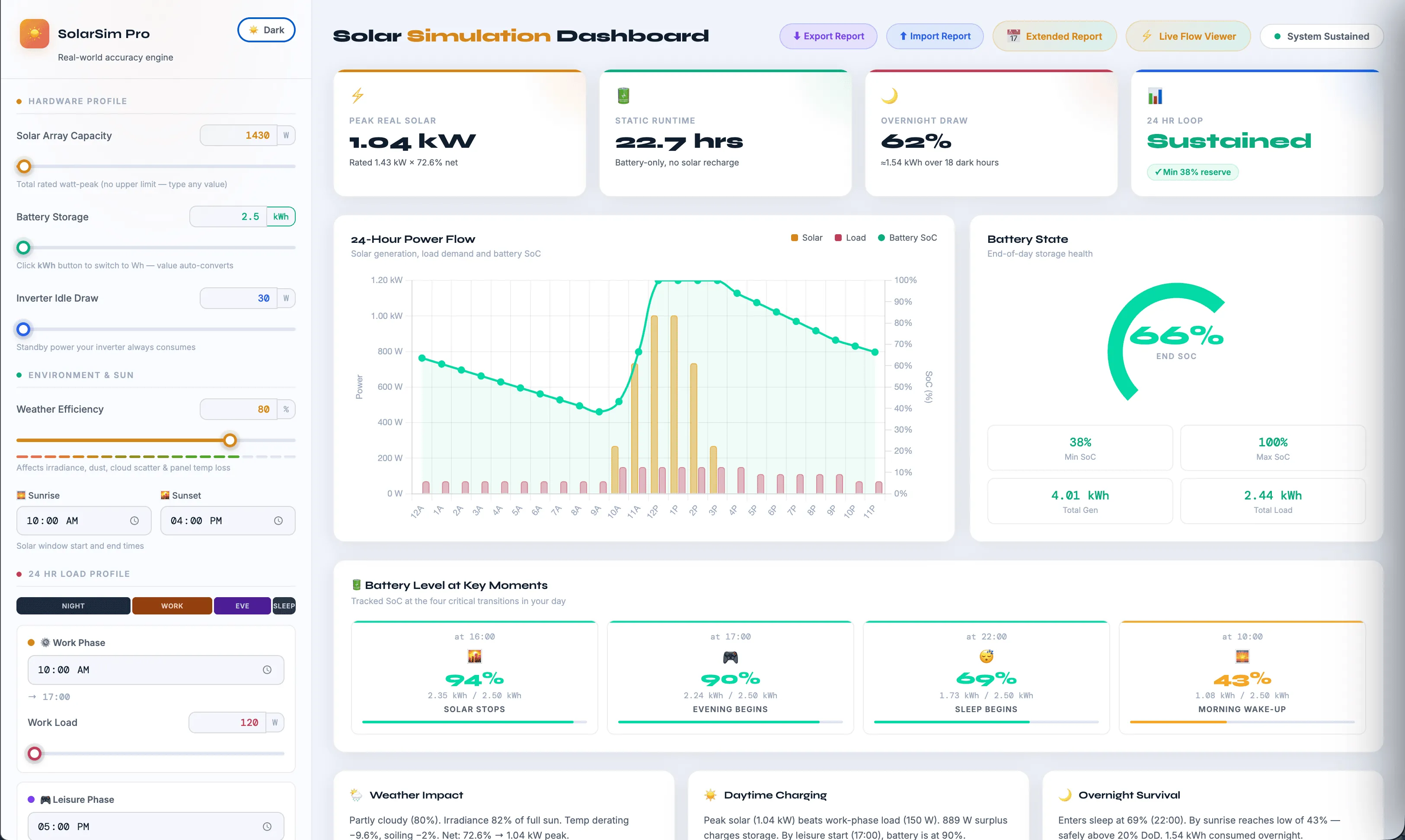
Project Overview
Solar Simulator Pro is an interactive web-based tool designed to address a critical infrastructure challenge facing creatives and remote workers across Nigeria: unreliable electricity supply and the need for sustainable, affordable off-grid backup power solutions.
The simulator empowers users to design customized solar systems by either specifying their electrical load and discovering the required system cost, or setting a budget and determining what load they can sustainably power. This bidirectional design approach democratizes solar system planning, replacing manual quotation processes with data-driven configuration modeling.
Key Features
- Dual-Direction Configuration: Design systems by load (specify devices, get cost) or by budget (set budget, discover feasible load)
- Real-Time Load Analysis: Hour-by-hour breakdown of power consumption across different times of day and weather conditions
- Weather Integration: Model system behavior under varying weather — sunny, cloudy, rainy — with real-time generation estimates
- Extended Survival Modeling: Multi-day simulation to forecast battery depletion and system viability over extended periods without full sun
- Phase-Based Time Configuration: Define distinct operational phases (e.g., work hours, standby, charging) with independent load profiles
- Import/Export Configurations: Save system designs as JSON and reload them later for refinement or reuse—critical for iterative planning with solar providers
- Interactive Visualizations: Real-time charts showing solar generation, battery state-of-charge, and load distribution over 24-hour cycles and extended simulations
- Dark/Light Theme Toggle: Full theme support with persistent preference storage
Tech Stack
- HTML5 Canvas API — Custom real-time graphics rendering for interactive simulation visualization and phase timeline animations
- Vanilla JavaScript (ES6+) — No frameworks or build tools; all logic self-contained for minimal deployment friction
- Chart.js 4.4+ — Time-series charting for solar generation, load, and battery state-of-charge curves with real-time updates
- LocalStorage API — Persistent storage of user configurations, theme preference, and simulation state
- CSS Custom Properties (CSS Variables) — Design system tokens for colors, spacing, shadows, and transitions; seamless dark/light theme switching
- CSS Flexbox & Grid — Responsive layout with sidebar controls, main viewport, and floating panels
The Nigerian Electricity Crisis
Nigeria faces a critical electricity infrastructure challenge: the national grid is unreliable, with frequent outages and supply gaps that disproportionately affect remote workers, creatives, and small-to-medium businesses. For creatives working from home — designers, developers, content creators, videographers — prolonged power loss directly translates to lost work, missed deadlines, and income disruption.
While solar energy offers a viable long-term solution, the path to adoption is fraught with friction: solar installers and service providers typically rely on manual quotation processes, clients have minimal visibility into system costs, and there is no standardized way to understand trade-offs between system size and investment.
Core Pain Points
- Manual Quotation Process: Users must contact multiple solar providers, describe their load requirements (often inaccurately), and wait for manual quotes — a time-consuming, opaque process with no self-service option
- Hidden System Costs: Without transparent modeling, users don't know upfront what a system will cost to run specific devices or maintain a certain runtime capacity
- Lack of Scenario Planning: Users cannot explore trade-offs (e.g., "If I add 2 hours of AC usage, what's the cost impact?") before committing to a provider
- No Extended Survival Insight: Systems are sized for daily cycles, but users need to understand multiday viability during extended cloud cover or rainy season — this information is rarely provided upfront
- Technical Literacy Barrier: Average users do not understand the relationship between kW, kWh, battery capacity, solar panel efficiency, or how weather impacts generation — making them vulnerable to overpricing or undersizing
Interactive System Design Interface
Solar Simulator Pro puts system design directly in the hands of the user with an intuitive, visual sidebar control panel:
- Load Configuration: Define individual devices with wattage and daily runtime, organized by load category (workstation, lighting, etc.)
- System Parameters: Input solar panel capacity (kW), battery storage (kWh), charge/discharge rates, and efficiency coefficients
- Cost Estimation: Real-time calculation of total system cost based on panel/battery sizing — users immediately see ROI implications
- Unit Flexibility: Toggle between kWh/Wh for battery sizing and between different load unit conventions
Real-Time Load Visualization
The main canvas displays a live hour-by-hour breakdown:
- Solar Generation Curve: How much power the system generates from sunrise to sunset, accounting for panel efficiency and angle
- Load Profile: Cumulative user load across all configured devices, visualized against generation capacity
- Battery State-of-Charge (SOC): Real-time calculation showing how much battery remains after accounting for daytime excess and nighttime drain
- Weather Scenarios: Visual simulation of how system performance changes under sunny, cloudy, or rainy conditions
Extended Survival Analysis
Beyond the daily 24-hour cycle, users can run multi-day simulations to answer critical questions:
- "How many days can my battery sustain my load during the rainy season with zero sun?"
- "If I add a fridge to my system, does battery capacity need to increase?"
- "What's the minimum panel size required to recharge the battery in one sunny day?"
The simulator models multi-day scenarios with configurable weather patterns and displays time-to-depletion, daily recharge capacity, and system viability thresholds.
Persistence & Iteration
A critical feature: users can export their entire configuration as JSON and import it later — enabling:
- Iterative Design: Fine-tune the system over multiple sessions without re-entering all parameters
- Multi-Provider Comparison: Export one design and send it to multiple solar providers for competitive quotes
- Configuration Reuse: Save a baseline design and use it as a template for future projects or client work
- Version Control: Keep multiple versions of designs with different load scenarios and compare outcomes
Design & Interaction Principles
- Mobile-Responsive Layout: Sidebar collapses to a drawer on tablets/mobile; main canvas scales fluidly
- Real-Time Feedback: Every input change instantly updates all visualizations — no "save" button required
- Dark/Light Theme: Theme preference persists in localStorage; smooth CSS transitions during theme switching
- Accessible Form Controls: Sliders with accompanying number inputs for precision; color-coded chips for device and system status
Project Impact
- Self-Service System Design: Users no longer depend on manual quotations; they can explore configurations independently and arrive at provider meetings with informed requirements
- Transparent Cost Estimation: Real-time cost feedback removes hidden surprises and enables budget-based scenario planning
- Multiday Survival Confidence: Extended simulations show realistic worst-case scenarios (e.g., 3 days of cloud cover), enabling properly sized systems
- Accelerated Provider Conversations: When users arrive with exported configurations and multi-scenario analysis, solar providers can move directly to pricing and installation — no need for discovery meetings
- No Friction Deployment: Pure HTML/CSS/JS with no build process means instant deployment to Vercel, CDNs, or any static host; zero infrastructure cost
Key Achievements
- Bidirectional Design Logic: Implemented both "load → cost" and "budget → feasible load" modes, allowing users to approach system design from either direction based on their primary constraint
- Canvas-Based Real-Time Rendering: Built custom Canvas animations for phase timeline and flow visualization, eliminating dependency on third-party animation libraries
- Comprehensive Time-Series Analysis: Accurate solar generation modeling with weather attenuation, battery charge/discharge curves, and multi-day survival prediction
- Persistent Configuration Management: JSON import/export enables complex workflows without a backend, keeping the tool entirely client-side and serverless
- Responsive, Theme-Aware UI: Cohesive design system with CSS variables enabling instant theme switching without page reload
Learnings & Future Directions
- Vanilla JavaScript at Scale: Demonstrated that sophisticated UIs with real-time Canvas rendering, interactive controls, and complex state management can be built without frameworks — reduces bundle size, improves deployment speed, and eliminates framework lock-in
- Domain Knowledge in the UI: Embedding solar physics (generation curves, battery chemistry, seasonal patterns) directly into the UI reduces the cognitive load on users and builds trust through transparency
- Persistence as a Feature: The ability to save and share configurations in JSON format proved invaluable for enabling multi-provider comparison workflows — a feature traditionally reserved for backend-heavy SaaS tools
- Future: Mobile App Version: A React Native or Flutter port could enable users to run simulations and manage configurations on-device, with offline support
- Future: Provider Integration: APIs for solar installers to embed simulation results in quotes and track customer design iterations